
Table of Contents
Standing Desk Power Strip: Workstation Power Distribution Mechanics
Configuring a motorized height-adjustable workstation requires centralizing your AC electrical supply so that only a single main cord traverses the moving leg. Mounting a dedicated standing desk power strip directly to the work surface eliminates tension shear on connected computer and display power bricks during elevation cycles.
When selecting a mounting strategy, workstation builders face a functional trade-off between an edge clamp-on socket block and an under-desk horizontal wire basket. Deciding where to anchor your primary standing desk power strip depends heavily on your daily peripheral plugging frequency and total transformer thermal dissipation.
| Metric | Clamp-On Power Strip | Under-Desk Tray Mounted |
|---|---|---|
| Accessibility | Immediate top-of-desk plug access | Concealed beneath desktop surface |
| Visual Profile | Visible edge profile with cords showing | 100% invisible clean floor clearance |
| Transformer Bulk | Limited to small standard AC plugs | Accommodates heavy 140W+ GaN power bricks |
| Thermal Clearance | Open room ambient air cooling | Passive convective wire mesh cooling |
Top-of-Desk Clamp Accessibility vs. Clean Visuals
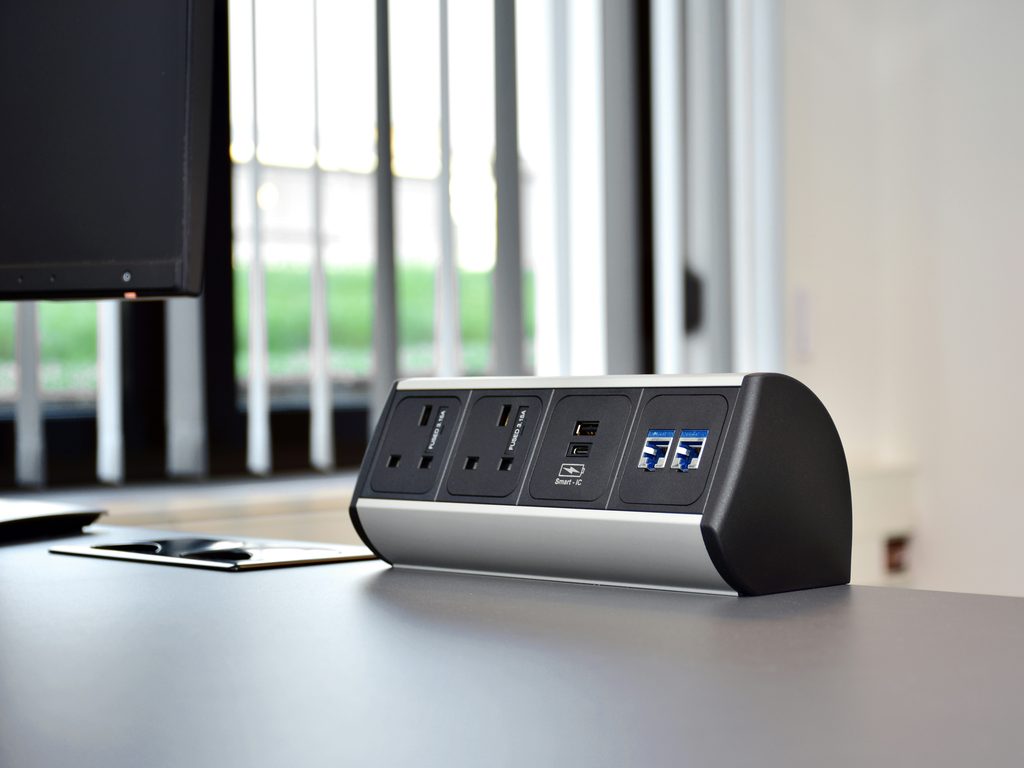
When mounting a standing desk power strip, a clamp-on desktop outlet block fastens directly over the rear or side bevel of the tabletop using an integrated thumb-screw C-clamp.This configuration delivers immediate charging access for temporary laptops, external test equipment, and camera batteries without kneeling on the floor.
However, running multiple permanent monitor and PC cords up onto the top surface compromises workspace minimalism. To prevent visible wire clutter, high-performance setups route primary static hardware through an undermount raceway, as detailed in our analysis of magnetic cable channel vs under-desk tray configurations.
Thermal Load and GaN Charger Dissipation
High-wattage laptop chargers and display power supplies generate significant heat during sustained processing loads. Grouping multiple heavy AC adapters closely together on a small strip can cause thermal accumulation.
Deploying your primary standing desk power strip inside a heavy-gauge wire basket allows heat to dissipate freely into the ambient under-desk air. Fasten the power supply securely using commercial hook-and-loop straps to prevent vibration rattles when adjusting height.
Dynamic Single-Drop Tension Calibration
The cardinal rule of height-adjustable electrical infrastructure is running a single heavy-duty 14 AWG grounded cord from the desk down to your wall or UPS receptacle. Never allow multiple individual power cords to dangle freely across the vertical travel zone.
Always calibrate your supply drop at maximum stroke elevation with our proven standing desk cable management rules. Maintaining a 15% slack service loop ensures your primary standing desk power strip never rips cords from wall outlets during full upward motorized extension.
Pairing a top-surface clamp for mobile peripherals with a heavy-duty under-desk tray creates the ultimate standing desk power strip workflow for clean cable routing and sustained electrical safety.
Pairing a top-surface clamp for mobile peripherals with a heavy-duty under-desk tray creates the ultimate standing desk power strip workflow for clean cable routing and sustained electrical safety.
Voltage Drop Calibration and Long-Run Power Delivery
When engineering a dynamic workstation around a motorized sit-stand desk, line resistance across long power leads directly impacts peripheral performance. Standard consumer surge blocks often utilize narrow 16 AWG or 18 AWG copper conductors designed for short static drops. Extending these lightweight cords across full vertical strokes causes measurable voltage drop when high-draw peripherals—such as multi-rail PC power supplies and high-nit dual monitors—pull peak current simultaneously.
Deploying an industrial standing desk power strip equipped with a heavy-duty 14 AWG or 12 AWG shielded trunk prevents line loss and thermal buildup across dynamic elevation paths. Thicker copper gauge lowers electrical resistance, ensuring stable nominal voltage reaches your laptop GaN chargers and secondary peripherals even at peak motorized extension. Additionally, heavy-gauge rubberized jacketed cords resist mechanical pinch shear when articulating alongside structural steel desk legs.
To preserve ongoing electrical integrity, audit your cable clamp retention points on a bi-monthly basis. Verify that secondary extension leads maintain an unobstructed bend radius without sharp crimps against under-desk crossbeams or mounting brackets. Structurally isolating high-voltage distribution trunks away from high-speed data interconnects prevents electromagnetic induction, safeguarding your hardware investments and maintaining fluid workstation operation across every elevation cycle.
Continuous Wattage Load and Circuit Breaker Calibration
When integrating multiple computing peripherals into a standing desk power strip, calculating continuous wattage draw prevents accidental overcurrent trips. Standard commercial branch circuits provide 15 amps at 120 volts, delivering an absolute maximum ceiling of 1,800 watts. Following standard electrical codes, continuous loads operating for three hours or longer should never exceed eighty percent of circuit capacity, capping your safe sustained workstation draw at 1,440 watts.
High-performance workstation equipment—such as multi-rail PC power supplies, dual high-nit monitors, studio speakers, and high-wattage charging blocks—can produce significant aggregate inrush current when powering on simultaneously. Selecting an industrial standing desk power strip with an integrated master thermal circuit breaker protects connected computing hardware against localized spikes while ensuring continuous, balanced voltage across every connected work accessory.
Surge Suppression Joules and Equipment Clamping Thresholds
Selecting a reliable standing desk power strip requires auditing its internal metal oxide varistor rating, commonly measured in joules. Standard household power strips often provide minimal surge protection below five hundred joules, which degrades rapidly after minor utility fluctuations. For high-end creative workstations powering professional studio monitors, external graphics enclosures, and precision multi-drive NAS units, target a minimum rating of eighteen hundred to three thousand joules to shield sensitive power supply units from dirty utility grid surges.
Equally important is the clamping voltage specification, which dictates how quickly the protective circuit diverts transient overvoltage spikes away from your computing load. High-grade commercial power strips maintain a clamping voltage threshold between three hundred thirty and four hundred volts, reacting within one nanosecond of voltage anomalies. Pairing robust joule absorption with rapid clamping reaction times ensures your height-adjustable workstation maintains uncompromised electrical defense throughout demanding daily processing tasks.
Balancing an accessible clamp-on desktop hub for mobile devices with an industrial under-desk tray delivers the ideal standing desk power strip setup for sustained electrical safety and wire clearance.